An AI email assistant can save time on long threads and first drafts, but it does not cut the amount of email you get, and you still have to check what it writes. Below is what the makers of Gmail and Outlook say their tools do, and a simple way to decide if one is worth your time. The decision part is my advice.
What does Gmail’s Gemini do with email?
Google’s help page for Gemini in Gmail lists these features: an AI Overview above search results, summaries of long conversations, Gmail Live (voice search of your mail in the Gmail app), Help me write, Proofread, and suggested replies. The page says you must be 18 or older and have a personal Google Account you manage. It says Workspace Experiments, where these features are listed, is not available for Google Workspace accounts. Some features need your account language set to English, and availability differs by country. If you see the Gemini icon in Gmail, you have access. The page shows no prices.
What does Copilot in Outlook do?
Microsoft’s help page on Copilot in Outlook lists four things:
- Prioritize my inbox labels incoming mail as high, low or normal priority and gives a reason.
- Summarize pulls the key points out of a thread. Microsoft’s summary page says the summary shows at the top of the thread, with numbered links to the emails it came from.
- Draft with Copilot writes a full email from a prompt, using the thread as context. You can set tone and length.
- Coaching by Copilot suggests changes to tone and clarity in your draft.
Microsoft says the features are for customers with a Microsoft Copilot (work) license. The page lists no prices and points to another page on how to get Copilot. It also says some mail will not work, such as signed or encrypted emails.
Can you trust what it writes?
Microsoft’s own wording is that AI-generated content is a good starting point, but you should review, edit and verify everything it creates. I would take that seriously. A summary can leave out the one line that mattered, and a draft goes out under your name. Read the original when the stakes are high, such as money, dates or a complaint.
Where does AI help, and where does it not?
My view, not a study result:
- Long threads you joined late. A summary gets you oriented in a minute. Then skim the last two messages yourself.
- First drafts of routine replies. Writing “yes, Thursday works, here is the address” takes no help. A tricky reply you keep putting off might.
- Tone checks. A coaching suggestion before you send an annoyed message can be useful.
It does not help with the real problem for most people, which is that too much mail arrives. A tool that summarizes 200 messages a day is still handling 200 messages a day.
Is it worth it for you?
Try this order:
- Cut the volume first. Unsubscribe, set filters or rules, and check email at fixed times. My post on how to stop email overload shows how.
- Count the long threads. If you get one a day, a summary may save you a few minutes. If you get one a month, it will not matter.
- Check the cost and the account type. Gemini in Gmail is for personal accounts, and Copilot in Outlook is for work licenses. Find out what you already have before you pay for anything.
- Test on one kind of task for two weeks. Say, summaries only. Keep it if you use it without thinking about it, and drop it if you forget it is there.
I am not recommending a product here, and I have not tested either one for this post. If your inbox has thousands of unread messages, start with how to clean up a messy inbox. My older list of 14 tips to get a grip on your email still holds up.
Want more?
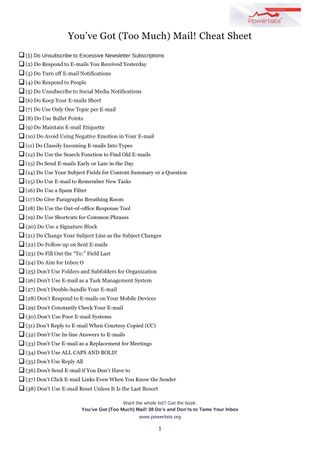
The book has 38 do’s and don’ts for taming your inbox, and the free cheat sheet gives you the short version.
You’ve Got (Too Much) Mail! 38 Do’s and Don’ts to Tame Your Inbox

Get the free You’ve Got Too Much Mail cheat sheet
Frequently asked questions
Can an AI email assistant save time?
It can help with long threads and first drafts, but it does not cut the amount of email you get, and you still have to check what it writes.
What does Copilot in Outlook do?
Microsoft lists prioritizing your inbox, summarizing threads, drafting emails from a prompt and coaching on tone and clarity. It is for customers with a Microsoft Copilot work license.
Can you trust what an AI writes for your email?
Microsoft says AI-generated content is a good starting point, and you should review, edit and verify it. Read the original when the stakes are high, such as money, dates or a complaint.
Is an AI email tool worth it?
Cut the volume first, count how many long threads you get, check the cost and account type, and test it on one kind of task for two weeks.