The simplest way to manage several email accounts is to read them in one place and keep only the accounts you need. Gmail and Outlook can both pull in other addresses, and Gmail can send from them too. Below: how each one does it, the limits their help pages list, and how to keep the accounts from piling up again. Which accounts to keep and what each is for is my advice.
Why is one inbox easier than several?
Each extra place to check is one more habit to keep up. Five logins means five piles and five chances to miss something. My advice: pick one inbox as home base and bring everything else there, or close the accounts you do not need.
How do I check other accounts in Gmail?
Google’s help page says that on a computer you can add other accounts in Settings, then See all settings, then Accounts and import, under Check mail from other accounts. You click Add a mail account, enter the address and follow the prompts.
Google lists these limits:
- You can add up to 5 addresses.
- The other account must support POP access and secure connections.
- Only messages are imported, not folders or labels.
- Outlook accounts cannot be added on a computer. The page says to use the Gmail app instead.
The page also warns of coming changes to Gmailify and POP support. Read it before you set anything up, because this part may change (Google Gmail Help, check emails from other accounts).
How do I send from the right address in Gmail?
Google’s help page says to go to Accounts and import, click Add another email address under Send mail as, and confirm the address by clicking the link in the email Google sends. When you write a message, click the From line and choose the address. You can add up to 99 addresses. The same page says that from January 2027 Gmail will no longer support Send mail as for third-party addresses such as Yahoo or Outlook. Google Workspace aliases and other Gmail addresses are not affected (Google Gmail Help, send emails from a different address).
How do I add more than one account in Outlook?
Microsoft’s help page says that in new Outlook you go to View settings or Account info, then Accounts, then Your accounts, and under Email accounts select Add Account. In classic Outlook, select File, then Add Account, for each account (Microsoft Support, add an email account to Outlook). The page does not state a maximum number of accounts.
How do I keep several accounts from turning into chaos?
These steps are my advice. The help pages above do not cover them.
- Give each account one job. One for people, one for shopping and sign-ups, one for work. When you know the job, you know where mail belongs.
- Stop using the extras. Change your address on the services that matter, then let the old account go quiet.
- Use one place to read. Add the accounts to Gmail or Outlook so you open one inbox.
- Reply from the address the person wrote to. It looks right to them and keeps the thread tidy.
- Run the same routine on all of it. Check at set times and sort each message once. My list of 14 tips to get a grip on your email has the habits.
How do I decide which accounts to close?
This is my advice. List every account you have. Next to each, write what it is used for and when you last opened it. Any account with no job and no recent visits is a candidate to close. Before you close it, search it for bills, bank mail and sign-ups you still need, and move those to your home base address. Then let it sit quiet for a few weeks before you delete it.
If one account has thousands of unread messages, clear it first with how to clean out an inbox with thousands of unread emails. Otherwise you carry the mess into the new setup.
Want more?
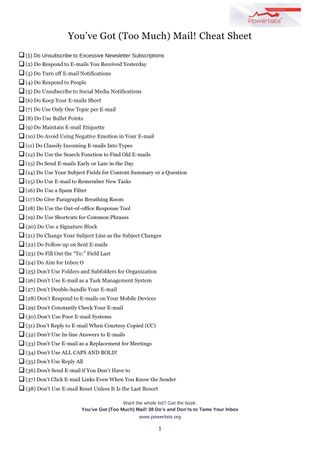
The book has 38 do’s and don’ts for taming your inbox, and the free cheat sheet gives you the short version.
You’ve Got (Too Much) Mail! 38 Do’s and Don’ts to Tame Your Inbox

Get the free You’ve Got Too Much Mail cheat sheet
Frequently asked questions
Can Gmail check my other email accounts?
Yes, on a computer. Google's help page says you can add up to 5 addresses, and that the other account must support POP access and secure connections.
Does Gmail import my folders and labels?
No. Google says only messages are imported, not folders or labels.
How do I add a second account in Outlook?
In new Outlook, open the account settings, go to Accounts and Your accounts, and select Add Account. In classic Outlook, choose File and then Add Account for each one.
Can I send from a different address in Gmail?
Yes. Under Send mail as in the settings, add the other address and confirm it. Google says you can add up to 99 addresses.